Turn Your Dog or Cat Photos Into Custom AI Art With ChatGPT
This article is an English translation of the original Japanese article. Read the original Japanese version.
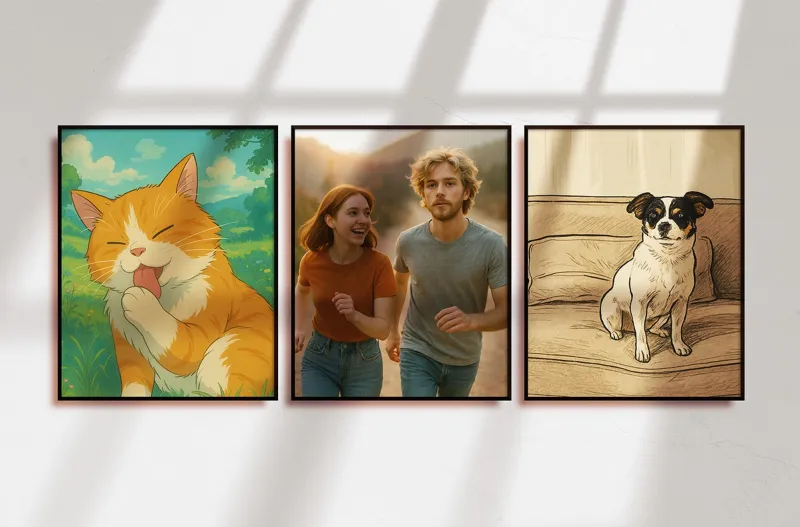
Wish you could turn your pet’s cutest photos into artwork you can keep forever? Learn how pet parents are using ChatGPT’s image tools to instantly create personalized illustrations and even humanized versions of their dogs and cats, often for free.
Key takeaways
Q. What do I need to create pet illustrations with ChatGPT?
You need to create a free account on OpenAI's official site and upload a photo of your dog or cat.
Q. What kind of photos work best for creating good illustrations?
Use bright photos where the face is clear, ideally showing the front of the face or the whole body.
Q. What should I do if the illustration is different from what I imagined?
You can ask it to regenerate or resend your request with more specific style and feature instructions.
Many pet parents have wished they could bottle up their dog’s goofy grin or their cat’s regal pose and keep it forever. Thanks to recent advances in AI technology, you can now turn your pet’s photos into custom illustrations in just a few clicks.
In this guide, you will learn how to use ChatGPT to transform your dog or cat photos into original AI art, from simple illustrations to Studio Ghibli inspired scenes and even humanized versions of your pets.
What Is ChatGPT and Why Are Pet Parents Using It
ChatGPT is a conversational AI tool developed by OpenAI. You interact with it in a chat window, just like messaging a friend, and it can understand natural language requests and respond in real time.
Originally, ChatGPT was used mainly for writing support, translation, and coding help. Today, it also includes powerful image generation features, which allow you to create pet illustrations, stylized portraits, and playful character art based on your own photos.
Because it is easy to use and often available at no cost, many pet guardians now rely on ChatGPT to create:
- Custom pet portraits for phone wallpapers and social media
- Stylized art in specific looks, such as painterly or anime inspired
- Humanized versions of their dogs and cats as if they were movie characters
Getting Started With ChatGPT
To begin, you will need a free OpenAI account. Visit the official ChatGPT website and follow the on screen instructions to sign up.
You can register using an email address or a Google account. After confirming your details and entering your name and date of birth, your account setup is typically completed within a minute.
Once you are logged in, you will see the main chat screen. This is where you can upload pet photos and type your requests.
Uploading Your Pet’s Photo
To create an illustration, ChatGPT first needs to analyze a real photo of your pet. On the chat screen, look for the plus icon near the message input area. From there, you can select a photo from your device.
For the best results, experts recommend choosing images where:
- Your pet’s face is clearly visible
- The lighting is bright and even, without heavy shadows
- The photo shows a front view or a full body pose, if possible
Clear, well lit photos help the AI understand your pet’s unique features, which often leads to sharper, more recognizable illustrations.
How To Write Effective Prompts for Pet Illustrations
In AI art, your written request is called a prompt. ChatGPT reads your prompt and generates an image that matches your description as closely as possible.
You can start with simple prompts such as:
- “Please turn this dog photo into an illustration.”
- “Please create a Studio Ghibli style illustration of this cat.”
- “Please turn the dogs in this photo into realistic illustrated characters.”
For even better results, be polite, specific, and descriptive. Clear prompts help the AI understand your vision and reduce the need for repeated attempts.
Consider including details like:
- Breed or look for recognizability, for example “Keep the Shiba Inu like expression.”
- Facial features, such as “Make the eyes slightly larger and bright.”
- Art style, for example “Soft watercolor style” or “Anime style with warm colors.”
The more thoughtfully you describe what you want, the closer the final illustration will be to your ideal image.
Example 1 Turning a Chihuahua Photo Into Art
Imagine you upload a photo of a small Chihuahua sitting on a sofa and type the prompt:
“Please turn this boy Chihuahua in the photo into an illustration.”
Even with this fairly general request, ChatGPT can generate a painterly, art like version of your dog. The pose and angle may be slightly different from the original photo, which shows that the AI is creating a new image rather than simply applying a filter.
Compared with older photo editing apps, this approach offers more flexibility. You are not limited to preset filters and can instead guide the AI toward a unique, custom portrait.
Example 2 Studio Ghibli Style Cat Illustration
One of the most popular trends among pet parents is asking for Studio Ghibli inspired art. For example, you might upload a photo of your cat grooming and request:
“Please create a Studio Ghibli style illustration of this cat.”
Within about a minute, ChatGPT can transform an ordinary grooming snapshot into a cinematic, animation like scene that feels ready for a movie night. The result often features soft colors, expressive eyes, and a cozy atmosphere that many cat guardians love.
While the AI does not copy any specific film, it can echo the whimsical, storybook feeling that fans associate with that style.
Example 3 Humanizing Your Dogs as Characters
Another playful option is to ask ChatGPT to turn your pets into human characters. Suppose you upload a photo of a Corgi and a Yorkshire Terrier together and write:
“Please turn the dogs in this photo into humans.”
ChatGPT can generate an image where your dogs are reimagined as human characters with features inspired by their original appearance. You might see a short, energetic character echoing the Corgi and a stylish, elegant figure reminiscent of the Yorkie, almost like a pair of Hollywood stars.
Sometimes, the first result may not match your mental image perfectly. In those cases, you can:
- Ask for regeneration, for example “Please regenerate this image.”
- Add more detail, such as “Make the Corgi inspired character more casual” or “Give the Yorkie inspired character longer hair and a softer expression.”
By refining your prompt step by step, you can guide the AI toward a version that truly feels like your dogs in human form.
Once you have a favorite illustration, consider saving it as your phone wallpaper or printing it as a small poster or postcard. Many pet parents enjoy using these images as conversation starters or keepsakes.
How Far AI Pet Art Has Come
AI can sound intimidating at first, but tools like ChatGPT are designed to be accessible even for beginners. With just a clear photo and a simple prompt, you can experiment with styles that used to require professional artists or advanced software.
Today, it is possible to obtain custom, made to order art of your dog or cat in seconds, often at no cost. For many pet guardians, this feels like a glimpse into the future of creative pet care and memory keeping.
As you explore these tools, remember that AI art is not a replacement for real life moments with your pet. Instead, it is a way to celebrate those moments and preserve them in new, imaginative forms.
Making Everyday Moments With Your Pet Even More Special
Turning your pet’s photos into AI generated illustrations can make ordinary snapshots feel extraordinary. With ChatGPT, you can create everything from gentle watercolor portraits to playful humanized characters that reflect your pet’s personality.
If you have been curious about AI but unsure where to start, consider beginning with a single favorite photo of your dog or cat. Upload the image, write a clear, kind prompt, and see what the AI creates.
You may discover a new way to honor your bond with your pet and add a bit of magic to your daily routine as a pet parent.
- 03.20.2026
- 04.11.2025